
How to Automate Your WordPress Blog with AI (Step-by-Step)
If you’ve been manually writing, formatting, and publishing every blog post on your WordPress site, you already know how slow it gets. A single post can eat two to three hours — outlining, drafting, adding headings, writing the meta description, setting the slug, checking Yoast — and by the time you hit publish, half the day is gone.
There’s a faster way. This is a step-by-step guide to automating your WordPress blog with AI, using a tool called Novamira that connects AI directly to your WordPress installation. Not “kind of connected” — we’re talking full access to your posts, Yoast SEO settings, WP-CLI, and the WordPress file system, all controlled through a conversational AI interface.
Let’s get into it.
What Novamira Actually Does (And Why It’s Different)
Most “AI for WordPress” tools are basically writing assistants that spit out text you still have to copy, paste, format, and configure yourself. That’s better than nothing, but it’s not automation — it’s just AI-assisted typing.
Novamira is different. It’s a WordPress plugin that gives an AI agent — powered by Claude — direct, unrestricted control over your WordPress environment. When you tell it to publish a post, it publishes the post. When you tell it to update your Yoast SEO title and meta description, it does that too. When you want to run a WP-CLI command, bulk-update categories, or write a PHP snippet to the sandbox, it handles all of it through a simple chat interface.
The result is that your AI workflow goes from:
AI writes draft → you copy it → you paste into WordPress → you set the title tag → you write the meta → you pick the category → you add internal links → you schedule it
To:
You give instructions → Novamira does all of it
Here’s how to set that up from scratch.
Step 1: Install Novamira and Connect It to Claude
First things first — you need Novamira installed and active on your WordPress site.
From your WordPress dashboard, go to Plugins → Add New, search for Novamira, install it, and activate it. Once it’s active, you’ll see a Novamira menu item appear in your left sidebar.
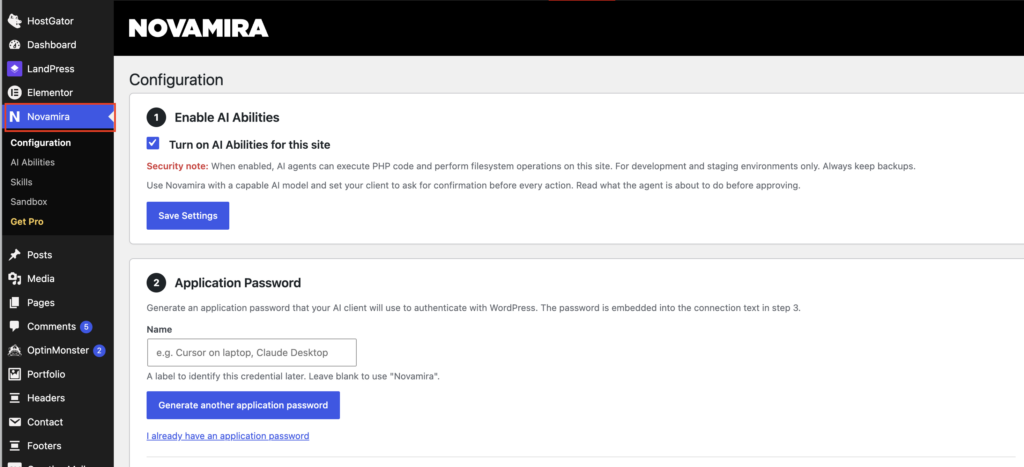
Open the Novamira settings and connect it to your Claude API key. If you don’t have one yet, you can get it from console.anthropic.com — there’s a free tier to start.
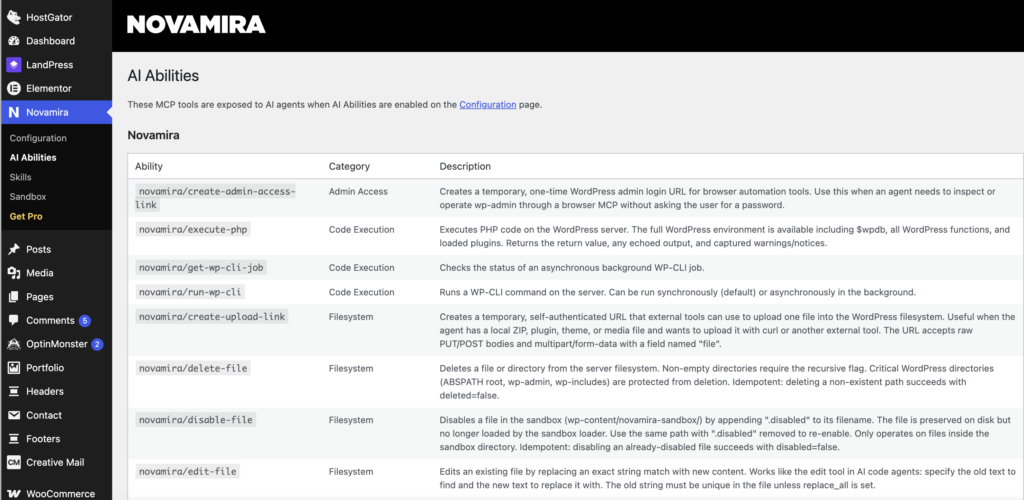
Once connected, you’ll have a chat interface inside your WordPress admin that has full access to:
- Creating, editing, and publishing posts and pages
- Setting Yoast SEO fields (title, meta description, focus keyword, schema)
- Running WP-CLI commands
- Reading and writing files in the WordPress sandbox
- Pulling Yoast readability and SEO scores for existing content
That last one is particularly useful for auditing your existing posts, which we’ll get to in Step 4.
Step 2: Build Your Keyword List (The Input for Everything Else)
Before you automate anything, you need a list of keywords to target. This is still the one step that requires real human judgment — no tool automates good keyword strategy for you.
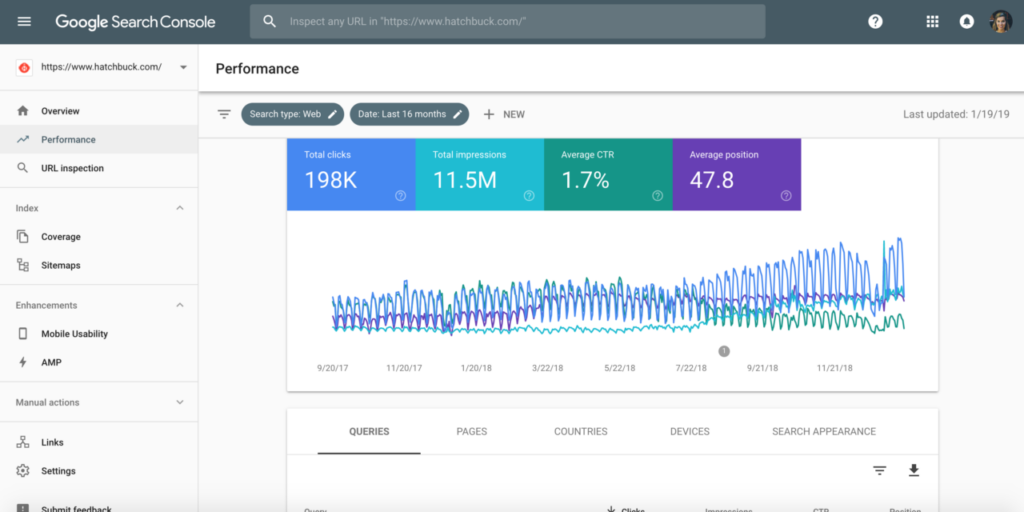
Pull up your Google Search Console and look at your current keyword performance. Sort by position and look for two buckets:
- Positions 11–25: You’re almost on page one for these keywords. A better, more comprehensive post on the same topic can push you over.
- Zero impressions, high intent: Topics directly relevant to your business that you haven’t covered yet.
For new keyword ideas, tools like Ahrefs, Semrush, or even Google’s free Keyword Planner work well. You’re looking for:
- Monthly search volume of 300+ (lower is fine for very niche topics)
- Keyword difficulty under 40 if you’re a newer site
- Clear informational or transactional intent that matches what you sell or cover
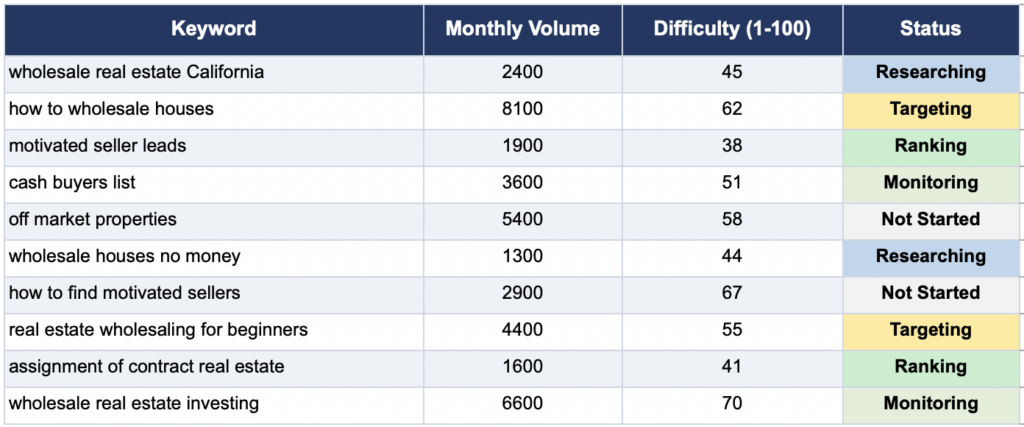
Build a simple spreadsheet — keyword, volume, difficulty, status. Aim for 20–30 to start. This becomes the content queue you’ll feed into Novamira.
Step 3: Use Novamira to Draft, Optimize, and Publish in One Workflow
Here’s where the actual time savings happen. Instead of a five-step manual process, your entire content workflow now runs through Novamira’s chat interface.
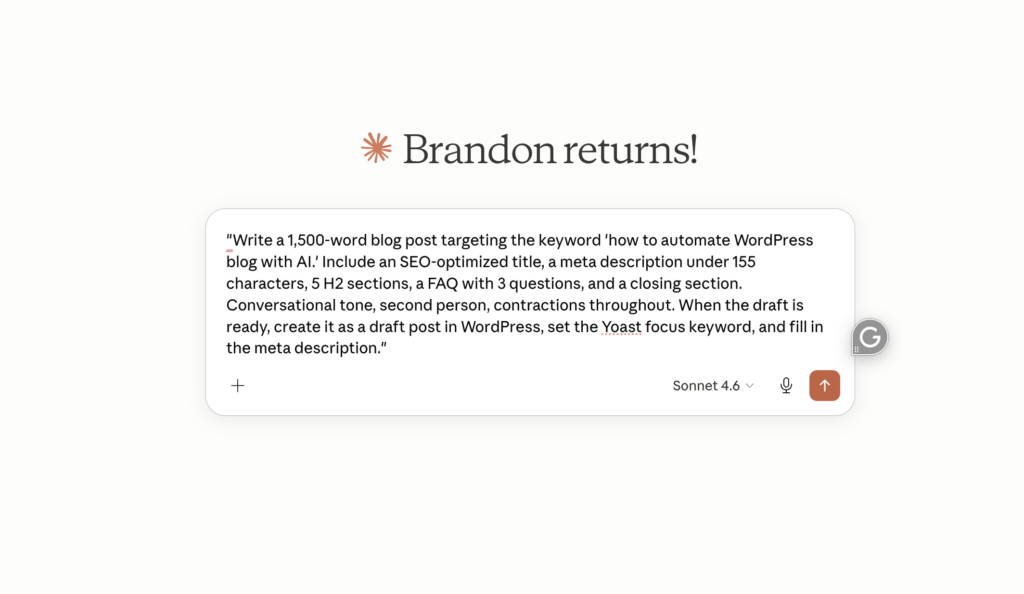
Open Novamira from your WordPress dashboard and give it an instruction like this:
“Write a 1,500-word blog post targeting the keyword ‘how to automate WordPress blog with AI.’ Include an SEO-optimized title, a meta description under 155 characters, 5 H2 sections, a FAQ with 3 questions, and a closing section. Conversational tone, second person, contractions throughout. When the draft is ready, create it as a draft post in WordPress, set the Yoast focus keyword, and fill in the meta description.”
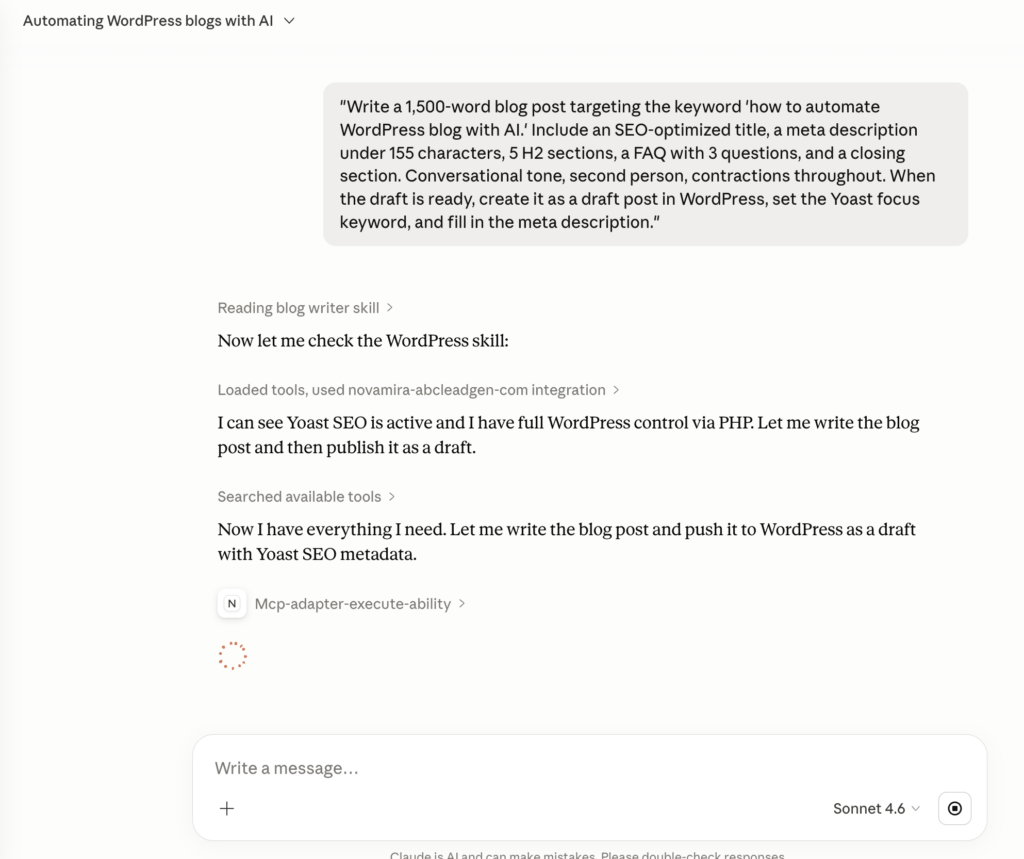
Novamira will:
- Generate the full draft using Claude
- Create the post in WordPress automatically
- Set the Yoast focus keyword field
- Fill in the SEO title and meta description
- Leave it as a draft so you can review before publishing
Your job at this point is editorial, not mechanical. Open the draft, read through it, and do three things:
- Fact-check anything specific — AI occasionally gets details wrong
- Add your voice — drop in one or two specific examples or opinions that a language model couldn’t produce on its own
- Tighten the intro and closing — these are where generic AI writing shows up most
That review process, for a well-prompted draft, takes 15–20 minutes. Not two hours.
Step 4: Audit Your Existing Content with Yoast + Novamira
One of the most underused parts of this workflow is using Novamira to improve posts you’ve already published.
In the Novamira chat, type:
“Pull the Yoast SEO scores for my 10 most recently modified posts. List any that are below 70 and tell me what the main issues are.”
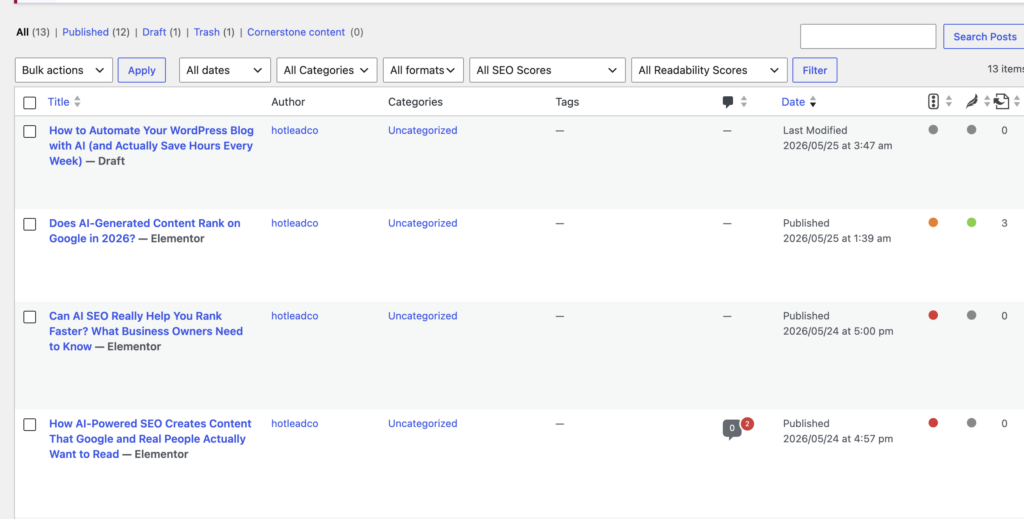
Novamira can call the Yoast SEO ability directly and surface exactly which posts need attention — missing meta descriptions, weak focus keyword placement, low readability scores, thin content. Then you can say:
“Rewrite the meta description for [post title] to include the focus keyword and stay under 155 characters. Update it in Yoast.”
And it does it. No clicking into each post, no copying text into a tool, no manually updating fields. It’s the kind of bulk SEO maintenance that used to take a full afternoon and now takes a few minutes of back-and-forth.
Step 5: Set Up a Publishing Schedule You Can Actually Stick To
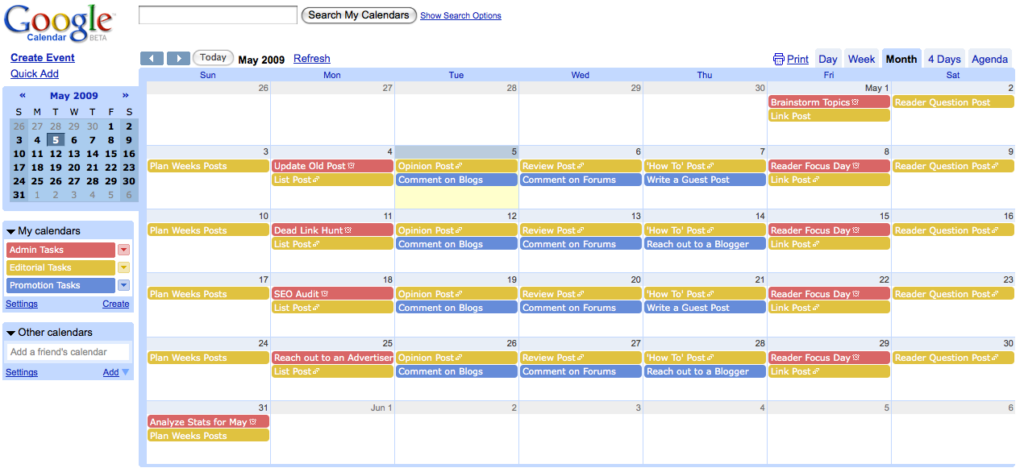
Consistency matters more than volume for SEO. Publishing four solid posts a month beats publishing twenty thin ones, and publishing consistently for six months beats a single burst of content followed by silence.
Use Novamira to schedule posts in advance so you’re not making a last-minute decision every time a publish date arrives.
Once you’ve reviewed and approved a draft, tell Novamira:
“Schedule this post to publish next Tuesday at 9am. Set the category to [your category], add these tags: [tag 1, tag 2, tag 3], and make sure the featured image is set.”
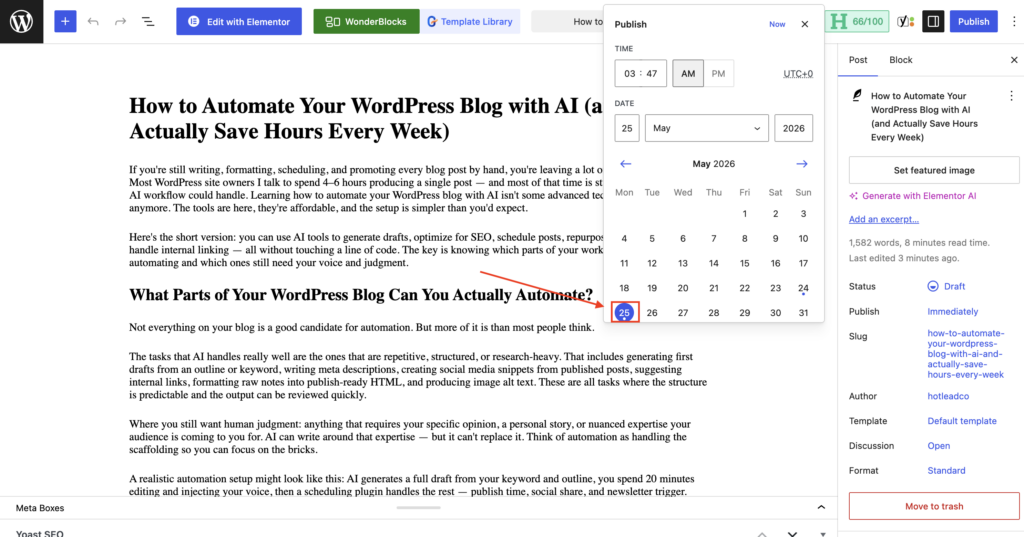
You can also ask Novamira to give you a summary of what’s currently scheduled:
“List all posts currently scheduled for the next 30 days, with their publish dates and Yoast SEO scores.”
That kind of pipeline visibility — without hunting through the posts list manually — makes it a lot easier to stay consistent.
What to Automate vs. What Still Needs a Human
This is worth being direct about, because the answer affects your ranking results.
Automate confidently:
- First draft generation from a keyword and outline
- Yoast SEO field population (title, meta, focus keyword)
- Post creation, categorization, tagging, scheduling
- Bulk SEO audits of existing content
- FAQ sections, meta descriptions, internal link suggestions
- WP-CLI tasks like regenerating thumbnails, flushing cache, updating slugs
Keep a human in the loop:
- Final editorial review before publishing — always
- Adding specific examples, original data, or real opinions
- Topics requiring lived experience (health, finance, legal, personal stories)
- Any post where you’re making claims that need verification
The teams that get burned by AI content automation are the ones who remove the human review step entirely. Don’t do that. The automation is for speed, not for replacing judgment.
Common Mistakes That Kill Your SEO Results
Generating without a clear prompt. Vague instructions produce vague content. “Write a blog post about WordPress” gives Novamira nothing useful to work with. Specific keyword, specific structure, specific tone — that’s what gets you a draft worth publishing.
Skipping internal links. Internal linking is one of the highest-leverage SEO activities on your own site, and it’s almost always the first thing to fall off when people automate content. Tell Novamira to suggest 3 internal link opportunities per post and add them to your review checklist.
Publishing everything at once. If you use Novamira to write 20 posts in a day and publish them all at once, you’re sending a signal that looks a lot like a content farm. Spread them out. Google’s site-reputation signals are real.
Ignoring readability scores. Yoast’s readability analysis isn’t just about grade level — it flags passive voice overuse, long sentences, and paragraph length, all of which affect how long people actually stay on your page. Novamira can pull those scores; use them.
https://yoast.com/beginners-guide-yoast-seo/
FAQ: Automating WordPress SEO Content with AI
Q: Does using Novamira to publish AI content violate Google’s guidelines?
No — Google’s policies target low-quality, mass-produced content designed to manipulate rankings, not AI content as a category. If you’re using Novamira to draft and a human to review, edit, and add genuine value before publishing, you’re operating within the spirit of what Google wants. The enforcement goes after unreviewed content at scale, not AI-assisted editorial workflows.
Q: Does Novamira work with any WordPress theme or page builder?
Novamira operates at the WordPress core level — it creates and manages posts via the WordPress database and REST API, independent of your theme or page builder. It works whether you’re using the block editor, Elementor, Divi, or anything else. For complex Elementor layouts, you’d still design the template manually, but Novamira handles the content and SEO layer.
Q: How many posts can I realistically produce per month using this workflow?
With a tight keyword list and the Novamira workflow running, most solo site owners can go from 2–4 posts a month to 12–16 without burning out. The bottleneck shifts from writing time to editorial review time, which is a much better problem to have. Quality still matters — don’t use that capacity to publish junk.
Start Automating This Week
The honest advice: don’t try to rebuild your entire content operation on day one. Pick one keyword from your list. Open Novamira, write a specific prompt, generate the draft, spend 20 minutes reviewing it, and schedule it to publish.
That first run shows you how the workflow actually fits your site, your voice, and your process. The second post takes less time. The fifth is close to automatic.
Automating your WordPress blog with AI through Novamira isn’t about removing the human from your content — it’s about removing the mechanical parts so your time goes into the stuff that actually differentiates your site. The specific perspective, the real examples, the editorial judgment that no AI can replicate on its own.
That combination is what ranks. And now you have the exact workflow to build it.
